

Let us make an amazing gadget with ESP32 and Arduino code. It will feature an SHT21 temperature/humidity sensor and currency conversion (you pick which one). Also there will be an Youtube subscriber live counter for good measure.
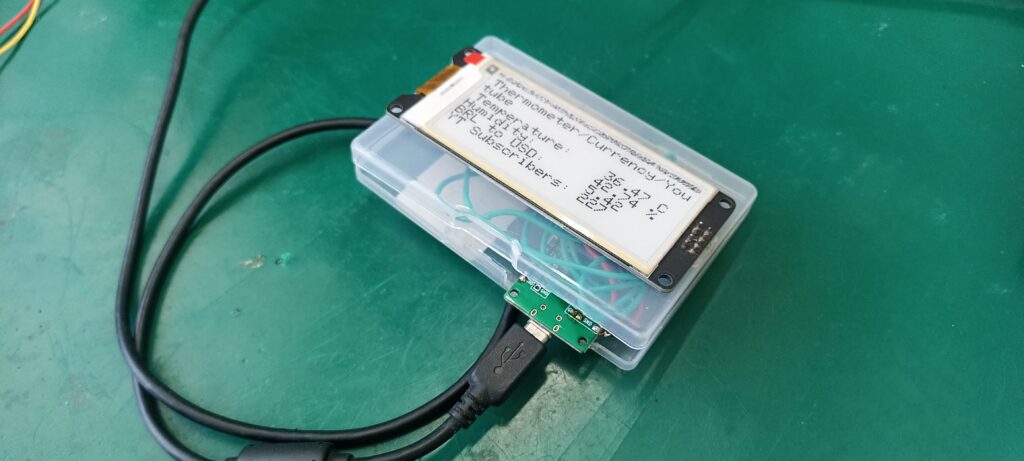
The idea is to create a small gadget that is roughly the size of the e-paper display itself, 2.9 inches across. Every six (6) minutes it will update all information on screen: temperature, humidity, currency conversion and Youtube subscribers counter.
Picture above summarizes the whole project, basically a small box with an USB cable for power. Then on top a 2.9″ e-paper display showing information. Does not get simpler than that, really. Of course the code has its own quirks but nothing too special or hard to grasp.
How it works?
This gadget is essentially an e-paper display controlled by an ESP32, in our case the ESP32-S2 Franzininho WiFi. In order not to spoil the *free* APIs we are using, I have decided to pull data only every six (6) minutes. Besides that, none of the data (temperature, humidity and currency) are that volatile to justify anything faster.
There is only a single sensor locally with the product, the well-known SHT21 from Sensirion. I have previously made a tutorial about it with ESP32, you can read it here. I decided to use the API from https://freecurrencyapi.com/ for currency conversion. That is since it was not bureaucratic nor complex to implement.
The same applies to Youtube, I used their official API to get subscribers counter. All you need is an API key and your channel ID. I talk about that more extensively in this blog post. Both FreeCurrencyAPI and Youtube API have service limits. This is precisely the reason I limit the display updates rate to every six (6) minutes.
Hardware
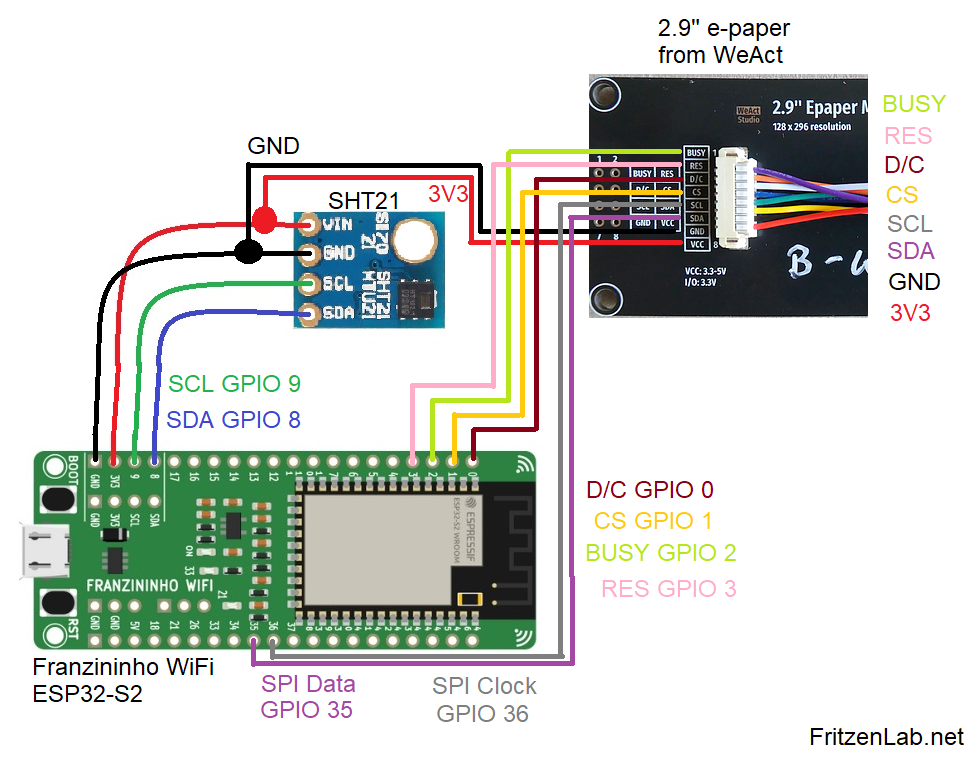
Controlling our WeAct 2.9″ e-paper display requires six pins, two of them being the data and clock for the SPI. The other four pins can be any other GPIO, really. I figured that the data and clock pins for SPI for the ESP32-S2 are GPIO 35 and 36.
Then the other four pins were put in GPIO 0, 1, 2 and 3, just for the sake of organization. Our SHT21 temperature and humidity sensor nees i2c communication, which is done via GPIO 8 and 9. Both sensor and display work with 3V3 and GND, neither are 5V tolerant.
Schematic diagram is seen below. Notice that there is no power supply wiring visible. This is since we are supplying it directly on to the micro-USB port of the Franzininho board.
Since these e-paper displays are available on Aliexpress (link here), there is little to no information available about it. I had to go deep into the 2nd, 3rd, 4th page of Google for that information. I end up finding an Adafruit library for those e-papers, that helped a lot with wiring.
SHT21 (buy here) connection is also very straightforward, all you need are SDA and SCL, besides 3V3 and GND. That is a sensor I have been using for a long time, nothing to complain. It just works, connection is quick and communication is reliable.
Firmware/code
I am using Arduino code for this project, with the IDE version 2.3.8 nightly. Any IDE version over 1.8.x will actually do the job. You need a couple of libraries in order to make it work, of which only one has to be downloaded and installed manually. That it the SHT21 library, from this link.
All other necessary libraries (Adafruit EPD, Adafruit GFX, WiFiClientSecure, ArduinoJson) can be installed from within the Arduino IDE. One has to insert a bit of personal data into the sketch: WiFi alias and password, FreeCurrency API code, Youtube API key and Channel ID.
Full code is seen below and also in my Github.
// Youtube code adapted from here: https://github.com/BloxyLabs/ESP32_YouTubeCounter/blob/main/ESP32_YT_Counter_V2/ESP32_YT_Counter_V2.ino
// Edit 01/03/2026: got help from Google Gemini to tune the code
/*
Franzininho WiFi (ESP32-S2), WeAct 2.9" e-paper display
D/C 0
CS 1
Busy 2
Res 3
SDA 35
SCL 36
*/

#include "Adafruit_EPD.h"
#include <Adafruit_GFX.h> // Core graphics library

#include <Wire.h>
#include <SHT21.h>  // include SHT21 library

SHT21 sht;

// Inclusão da(s) biblioteca(s)
#include <WiFi.h>       // Biblioteca nativa do ESP32
#include <WiFiClientSecure.h>
#include <HTTPClient.h> // Biblioteca nativa do ESP32
#include <ArduinoJson.h>

#include <YoutubeApi.h>

//double subs = 0;
long subs;

// Configurações da rede WiFi à se conectar
const char* ssid = "";
const char* password = "";
const char/ freeCurrencyAPIHere = "";
String payload;
String payload2;

HTTPClient http; // o objeto da classe HTTPClient
HTTPClient http2; // o objeto da classe HTTPClient

#ifdef ARDUINO_ADAFRUIT_FEATHER_RP2040_THINKINK // detects if compiling for
                                                // Feather RP2040 ThinkInk
#define EPD_DC PIN_EPD_DC       // ThinkInk 24-pin connector DC
#define EPD_CS PIN_EPD_CS       // ThinkInk 24-pin connector CS
#define EPD_BUSY PIN_EPD_BUSY   // ThinkInk 24-pin connector Busy
#define SRAM_CS -1              // use onboard RAM
#define EPD_RESET PIN_EPD_RESET // ThinkInk 24-pin connector Reset
#define EPD_SPI &SPI1           // secondary SPI for ThinkInk
#else
#define EPD_DC 0
#define EPD_CS 1
#define EPD_BUSY 2 // can set to -1 to not use a pin (will wait a fixed delay)
#define SRAM_CS -1
#define EPD_RESET 3  // can set to -1 and share with microcontroller Reset!
#define EPD_SPI &SPI // primary SPI
#endif

const char* apiKey   = "";
const char* channelIdNet = ""; // channel ID for the first channel
long subscribers= 0;
long repeatTime= 0;
bool startup= true;

/* Uncomment the following line if you are using 1.54" tricolor EPD */
// Adafruit_IL0373 display(152, 152, EPD_DC, EPD_RESET, EPD_CS, SRAM_CS,
// EPD_BUSY, EPD_SPI);

/* Uncomment the following line if you are using 1.54" monochrome EPD */
// Adafruit_SSD1608 display(200, 200, EPD_DC, EPD_RESET, EPD_CS, SRAM_CS,
// EPD_BUSY, EPD_SPI);

/* Uncomment the following line if you are using 2.13" tricolor EPD */
//Adafruit_IL0373 display(212, 104, EPD_DC, EPD_RESET, EPD_CS, SRAM_CS, EPD_BUSY,
//                        EPD_SPI);
//#define FLEXIBLE_213

/* Uncomment the following line if you are using 2.13" monochrome 250*122 EPD */
// Adafruit_SSD1675 display(250, 122, EPD_DC, EPD_RESET, EPD_CS, SRAM_CS,
// EPD_BUSY, EPD_SPI);

/* Uncomment the following line if you are using 2.7" tricolor or grayscale EPD
 */
// Adafruit_IL91874 display(264, 176, EPD_DC, EPD_RESET, EPD_CS, SRAM_CS,
// EPD_BUSY, EPD_SPI);

/* Uncomment the following line if you are using 2.9" EPD */
// Adafruit_IL0373 display(296, 128, EPD_DC, EPD_RESET, EPD_CS, SRAM_CS,
// EPD_BUSY, EPD_SPI); #define FLEXIBLE_290

/* Uncomment the following line if you are using 4.2" tricolor EPD */
// Adafruit_IL0398 display(300, 400, EPD_DC, EPD_RESET, EPD_CS, SRAM_CS,
// EPD_BUSY, EPD_SPI);

// Uncomment the following line if you are using 2.9" EPD with SSD1680
// THIS IS MY DISPLAY MODEL, YOURS MAY VARY
Adafruit_SSD1680 display(296, 128, EPD_DC, EPD_RESET, EPD_CS, SRAM_CS,
EPD_BUSY, EPD_SPI);

float temp; 	// variable to store temperature
float humidity; // variable to store hemidity

void setup() {
  // put your setup code here, to run once:
  display.begin();
  display.clearBuffer();
  Wire.begin();		// begin Wire(I2C)
  Serial.begin(115200);

  WiFi.disconnect(); // Desconecta do WiFI se já houver alguma conexão
  WiFi.mode(WIFI_STA); // Configura o ESP32 para o modo de conexão WiFi Estação
  Serial.println("[SETUP] Tentando conexão com o WiFi...");
  WiFi.begin(ssid, password); // Conecta-se à rede
  if (WiFi.waitForConnectResult() == WL_CONNECTED) // aguarda até que o módulo se
    //                                                  conecte ao ponto de acesso
  {
    Serial.println("[SETUP] WiFi iniciado com sucesso!");
  } else
  {
    Serial.println("[SETUP] Houve falha na inicialização do WiFi. Reiniciando ESP.");
    ESP.restart();
  }

}

void loop() {
  double conversion = 0;
  double conversion2 = 0;

  if((millis() - repeatTime > 360000) || startup == true){ // six minutes per loop entrance
    repeatTime= millis();
    startup= false;
    // --- START CURRENCY BLOCK ---
    // The curly braces {} ensure all memory used here is freed before YouTube starts
    {
      HTTPClient http;
      Serial.println("[HTTP] Iniciando requisição de moedas...");

      // Request 1: BRL
      http.begin("https://api.freecurrencyapi.com/v1/latest?apikey=freeCurrencyAPIHere");
      int httpCode = http.GET();

      if (httpCode == HTTP_CODE_OK) {
        String payload = http.getString();
        DynamicJsonDocument doc(2048);
        DeserializationError error = deserializeJson(doc, payload);
        if (!error) {
          conversion = doc["data"]["BRL"].as<double>();
          Serial.print("BRL: "); Serial.println(conversion, 4);
        }
      }
      http.end();

    }
    // --- END CURRENCY BLOCK (Memory is now clean) ---

    // Get Sensors
    temp = sht.getTemperature();
    humidity = sht.getHumidity();
    Serial.print("Sensor: "); Serial.print(temp); Serial.print("C | "); Serial.println(humidity);

    // Get YouTube (This now has much more RAM available)
    getSubscribersNet();

    Serial.print("IP Local: "); Serial.println(WiFi.localIP());

    // --- UPDATE DISPLAY ---
    display.clearBuffer();
    display.setCursor(5, 5);
    display.setTextColor(EPD_BLACK);
    display.setTextSize(2);
    display.println("Thermometer/Currency/Youtube");

    display.setCursor(5, 40);
    display.setTextSize(2); // Small text for data to ensure it fits
    display.print("Temperature:    "); display.print(temp); display.println(" C");
    display.print("Humidity:       "); display.print(humidity); display.println(" %");
    display.print("BRL to USD:     "); display.println(conversion, 2);
    display.print("YT Subscribers: "); display.println(subscribers);

    //Serial.println("Updating E-Paper...");
    display.display();

    // Wait 1 minute before next cycle
  }
}
// This function is for a single youtube channel
void getSubscribersNet() {
  Serial.println("--- Starting YouTube Update ---");
  WiFiClientSecure *client = new WiFiClientSecure;

  if (client) {
    client->setInsecure();
    HTTPClient http;
    String url = "https://www.googleapis.com/youtube/v3/channels?part=statistics&id="
                 + String(channelIdNet) + "&key=" + String(apiKey);

    if (http.begin(*client, url)) {
      int httpCode = http.GET();
      Serial.print("YouTube HTTP Code: ");
      Serial.println(httpCode);

      if (httpCode == 200) {
        String payloadYT = http.getString();
        DynamicJsonDocument doc(2048);
        DeserializationError error = deserializeJson(doc, payloadYT);

        if (!error) {
          if (doc["items"].size() > 0) {
            const char* countStr = doc["items"][0]["statistics"]["subscriberCount"];
            subscribers = atol(countStr);
            Serial.print("YouTube Success! Subscribers: ");
            Serial.println(subscribers);
          } else {
            Serial.println("YouTube Error: items array is empty (Check Channel ID)");
          }
        } else {
          Serial.print("YouTube JSON Error: ");
          Serial.println(error.c_str());
        }
      } else {
        Serial.print("YouTube GET Failed, error: ");
        Serial.println(http.errorToString(httpCode).c_str());
      }
      http.end(); // Move this here so it always closes correctly
    } else {
      Serial.println("YouTube Connection Failed at .begin()");
    }
    delete client;
  }
  Serial.println("--- End YouTube Update ---");
}
The Adafruit library for the e-paper display is very broad and complete, it supports many display sizes and types. You have to comment the one I am using and uncomment the one that fits your actual display. After that it is a matter of defining cursor position, font type and font size, then you are good to go.
SHT21 is also very easy to obtain information from. You just call these and get the answers in the variables indicated.
temp = sht.getTemperature();
    humidity = sht.getHumidity();
API interface
Both the Youtube subscribers counter and the currency conversion are obtained from APIs. As mentioned before, one has to take care not to spam the request URL. That would get you temporarily banned from reading from it.
I have created a function to separate the Youtube information fetching, called “void getSubscribersNet() {}”. The currency value is obtained from the line below, inside the loop() itself:
http.begin("https://api.freecurrencyapi.com/v1/latest?apikey=freeCurrencyAPIHere");Those two APIs are free to use, so you must not really rely on it for serious stuff. They can just stop working anytime, without warning.
End result and comments
Upon plugging the micro USB cable into the ESP32-S2 Franzininho, system will already do a reading of all values. This is due to the presence of a boolean variable called “startup”, that starts as true. So this IF statement “if((millis() – repeatTime > 360000) || startup == true){” will be entered right at the beginning of the execution.
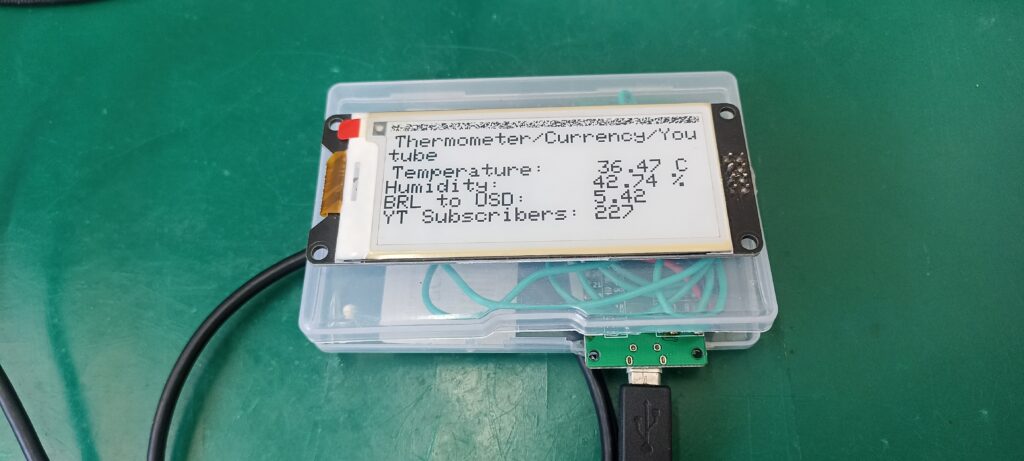
Such variable is then permanently put to “false”, making it useless during code execution. Next time the system does a complete reading and updates the display, only happens every six (6) minutes. Since we are using an e-paper display, even if you remove power, the information printed on screen wil remaing up.
I made a video explaining how the system works for this project, go back up the page at the beginning of the article. Enjoy the watch and comment on Youtube, if you will.
Pingback: Você vai amar este temporizador pomodoro - Fritzenlab eletrônica